Sam's Dynamics, Power Platform & AI Blog

Showing posts with label PowerPlatform. Show all posts

Monday, 28 August 2023

Web Resource vs PCF vs Canvas App - which of the one is used?

While started working on specific Business Requirements related to custom layout, there is a always common question that "where to start, which of the component needs to use?", so explaining component in brief to get an idea for the particular Business Requirements.


  • PCF (PowerApps Component Framework): PowerApps Component Framework (PCF) is a technology within the Microsoft Power Platform that allows developers to create custom components for use within Canvas Apps, Model-Driven Apps, and even in the Unified Interface of Dynamics 365. PCF enables you to create custom UI controls using familiar web development technologies like HTML, CSS, and JavaScript. These components can then be embedded into various app types and interact with data and events.


  • Canvas App: Canvas Apps are a part of the Microsoft Power Platform that enables you to create custom applications with a visual interface. These apps are typically built by users who may not have deep coding skills, as they rely on a drag-and-drop interface to design screens and logic. Canvas Apps allow you to connect to various data sources, including databases, SharePoint lists, and other services, and then build user interfaces and workflows using a visual designer. They can incorporate various controls and elements to create interactive user experiences.


  • Web Resource: A Web Resource is a concept primarily used in the context of Dynamics 365 and Power Apps to include custom web content within an application. A web resource can consist of HTML, JavaScript, CSS, or other web-related files. These resources can be used to extend the functionality of the platform by embedding custom UI elements, scripts, or even external web content directly within an application's user interface.


In summary:

  • PCF is a way to create custom UI components that can be used in various app types within the Power Platform.
  • Canvas Apps are custom applications with visual interfaces created using a drag-and-drop design approach.
  • Web Resources are used to include custom web content or scripts within Dynamics 365 or Power Apps.

The choice between these technologies depends on your specific requirements and your level of coding expertise. If you're looking to create custom UI components with more complex interactions, PCF might be the way to go. For building full-fledged applications with a visual interface, Canvas Apps could be the better choice. And if you need to include custom web content or scripts within your application, Web Resources can help you achieve that.


References:


Thanks for reading this article. Hope this Article will help you. Cheers!!!

Friday, 23 June 2023

Portal Revolution : ADX Portal, Dynamics Portal, PowerApps Portal, and Power Pages

ADX Portal, Dynamics Portal, PowerApps Portal, and Power Pages are all Microsoft technologies related to building web portals and applications. Here's a brief overview of each:


ADX Portal: ADX (Adxstudio) is a web portal framework that was acquired by Microsoft and integrated into Dynamics 365 Customer Engagement. It provides a platform for building and customizing web portals that can interact with Dynamics 365 data. ADX Portals are typically used for customer self-service portals, partner portals, or community portals.


Dynamics Portal: Dynamics Portal refers to the web portal functionality that is included in the Dynamics 365 suite of business applications. It allows organizations to create and customize portals for various purposes, such as customer support, employee self-service, or vendor management. Dynamics Portal provides integration with Dynamics 365 data and allows users to access and interact with relevant information.


PowerApps Portal: PowerApps Portal is a component of the Microsoft Power Platform, which includes PowerApps, Power Automate (formerly Flow), and Power BI. PowerApps Portals allow you to build externally facing websites or portals that provide access to data and processes from various sources, including Dynamics 365, SharePoint, and custom connectors. It provides a low-code environment for designing and deploying portals.


Power Pages: Power Pages is not a specific Microsoft product or technology. It might refer to a feature or concept related to the Power Platform or PowerApps, but without further context, it is challenging to provide specific information. If you can provide additional details or clarify your question, I would be happy to assist you further.


In summary, ADX Portal and Dynamics Portal are related to building web portals that integrate with Dynamics 365, while PowerApps Portal is a broader platform for creating portals with data integration capabilities. Power Pages requires more information to provide a specific answer.


Thanks for reading this article. Hope this Article will help you. Cheers!!!

Model-Driven App, Canvas App, and Power Pages

Model-Driven App, Canvas App, and Power Pages are all components of Microsoft Power Apps, a low-code development platform.

Each of these app types has its own characteristics and best use cases. Here's a brief overview of each:


Model-Driven App:

Model-Driven Apps are built around data models and provide a structured way to interact with complex data sets. They offer a more guided and structured user experience by leveraging the Common Data Service (CDS)/Dataverse or a custom data model. Model-Driven Apps provide pre-built components like forms, views, charts, and dashboards that are automatically generated based on the underlying data model. These apps are suitable for scenarios that involve working with structured data and require a higher level of customization and automation.


Canvas App:

Canvas Apps provide a highly customizable and flexible development experience, allowing you to design apps from scratch using a drag-and-drop interface. With Canvas Apps, you have complete control over the layout and functionality of the app. You can create responsive designs, integrate with various data sources, and leverage a wide range of controls and formulas to build the app logic. Canvas Apps are suitable for scenarios that require a high level of customization and flexibility, especially when working with multiple data sources or external APIs.


Power Pages:

Power Pages is a relatively newer concept introduced in Microsoft Power Apps. Power Pages combine the capabilities of both Model-Driven Apps and Canvas Apps, offering a hybrid approach. They provide a structured data model like Model-Driven Apps, but also allow for custom layout and design like Canvas Apps. Power Pages enable you to design rich pages using the app designer interface, combining pre-built components and customizations. They provide a balance between structured data modeling and flexible app design, making them suitable for a wide range of scenarios.


In summary, Model-Driven Apps are ideal for working with structured data and require extensive customization and automation. Canvas Apps offer maximum flexibility and customization options, while Power Pages provide a hybrid approach combining the best of both Model-Driven Apps and Canvas Apps. The choice between these app types depends on the specific requirements of your application and the level of control and customization you need.


Thanks for reading this article. Hope this Article will help you. Cheers!!!

Wednesday, 14 June 2023

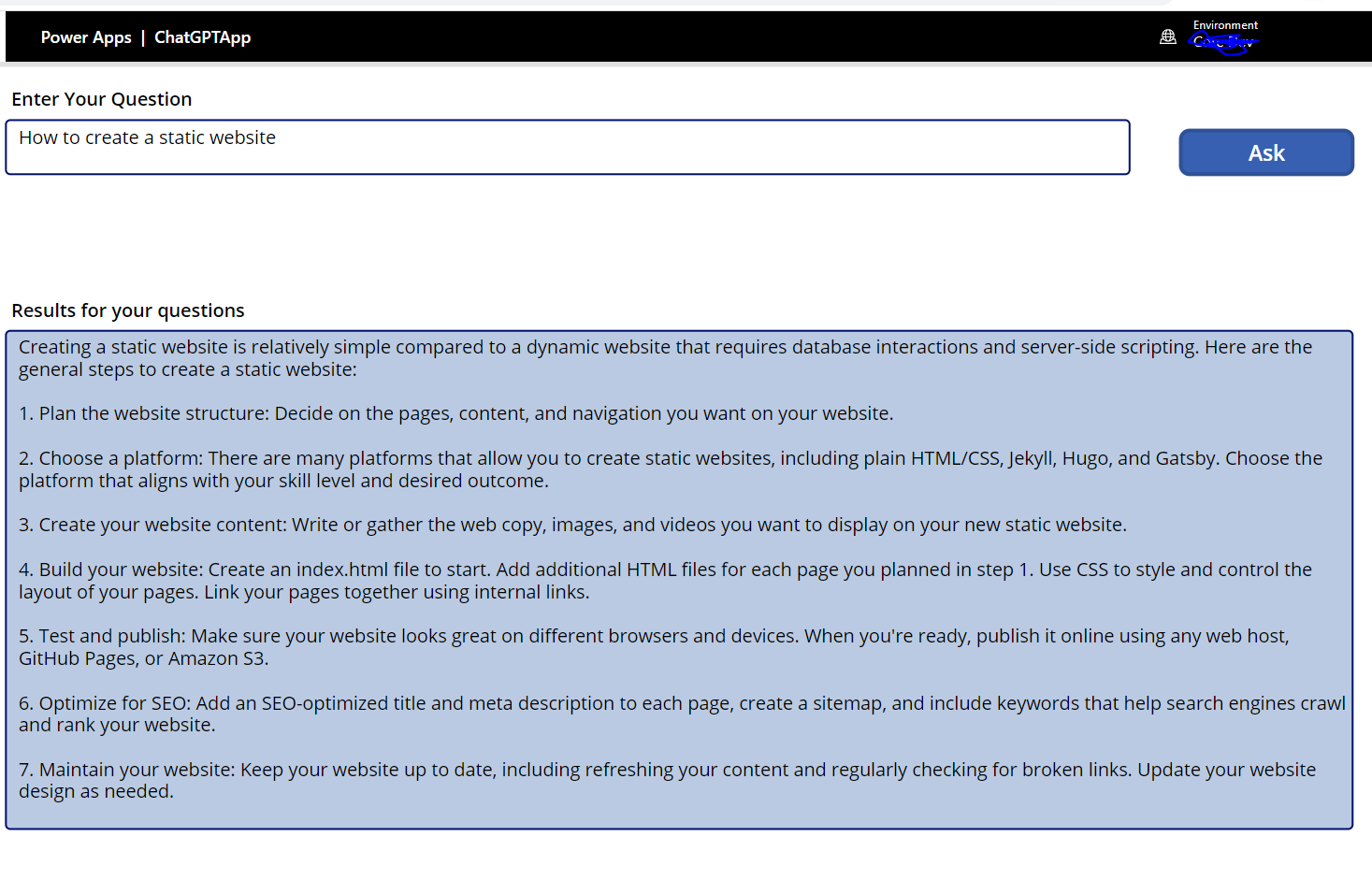
Integrate ChatGPT with PowerApps using Power Automate

ChatGPT is an advanced language model developed by OpenAI. It is specifically designed to generate conversational responses and engage in text-based dialogue. It belongs to the GPT (Generative Pre-trained Transformer) family of models. 

GPT models are based on the Transformer architecture, which is a deep learning model architecture known for its ability to process and generate sequences of data, such as text. These models have been pre-trained on large amounts of text data from the internet, allowing them to learn patterns, language structures, and context.

ChatGPT leverages this pre-training to understand and generate human-like text in a conversational manner. It has been trained on a diverse range of conversations and dialogues, enabling it to respond to user prompts or questions in a coherent and contextually relevant manner.

Users can interact with ChatGPT by providing text-based input or prompts, and the model generates responses based on its understanding of the given context. It can carry on multi-turn conversations, provide information, answer questions, and engage in interactive dialogue.

To integrate ChatGPT into PowerApps using Power Automate, you can follow these general steps:

  • Set up the ChatGPT API: Choose a ChatGPT API or service provider and obtain the necessary credentials or access keys.

 ChatGPT API reference document: -  https://platform.openai.com/docs/api-reference


  • Create a new flow in Power Automate: Go to the Power Automate portal (flow.microsoft.com) and create a new flow.
  • Set the trigger: Add a trigger to the flow by selecting the appropriate PowerApps trigger action. For example, you can use the "PowerApps button" trigger or the "PowerApps - When a record is created, updated, or deleted" trigger, depending on your requirements.


  • Initialize variables: Add actions to initialize variables that will store the user input and ChatGPT response. For example, create a variable called "UserInput" to store the user's message and a variable called "ChatGPT response" to store the generated response.

  • Connect to the ChatGPT API: Add an "HTTP" action to make a request to the ChatGPT API. Configure the action by specifying the API endpoint, headers, and authentication if required. Pass the user input stored in the "UserInput" variable as a parameter to the API.


  • Parse the API response: Add actions to parse the response received from the ChatGPT API. Extract the generated response from the API response object and store it in the "ChatGPT response" variable.


  • Return the response to PowerApps: Add a "Response" action to send the generated response back to PowerApps. Pass the "ChatGPT response" variable as a parameter.


  • Save and test the flow: Save the flow and test it to ensure it runs without errors. You can test it by triggering the flow from PowerApps or using the built-in test functionality in Power Automate.
  • Update PowerApps: In PowerApps, update the chat interface to display the conversation history and handle user input. Add a button or any appropriate control that triggers the flow created in Power Automate when clicked.


  • Handle the flow response in PowerApps: Once the flow is triggered and the response is received, update the chat interface in PowerApps with the generated response. For example, you can update a text box or a data source to display the conversation history.

Set(
    result,
'PowerApps-ChatGPTIntegrationFlow'.Run(TextInput1.Text).response
)


  • Test and refine: Test the integration thoroughly to ensure the chat functionality works as expected. Iterate and refine the implementation based on user feedback and identified improvements.


Thanks for reading this article. Hope this Article will help you. Cheers!!!

Wednesday, 17 March 2021

Graph APIs Calling option in "HTTP Request" connector in Power Automate

Graph APIs Calling option in "HTTP Request" connector in Power Automate. I have followed some below steps for calling Graph API:

a. Registered an App in Azure Active Directory and got Tenant ID, Client ID, Client Secret.


b. Created a Power Automate Flow and added HTTP request as an Action. In Authentication option inside HTTP action, selected Active Directory OAuth and added value for Tenant, Client ID, Secret etc.


Thanks for reading the article. Hope this Article will helpful for you. Cheers!!!

Thursday, 27 February 2020

Using of Azure Active Directory Graph API

In this article, we will discuss about How to use Azure Active Directory Graph API.

Note:- Before starting using we have to register a new app in Azure Active Directory and then need to assign Permissions, after that we are able to get Client ID, Client Secret, Object ID

Prerequisite:

i. Client ID
ii. Client Secret
iii. Object ID
iv. Azure Account User details (Username and Password)

So, let's discuss step by step:

Login to Azure AD: -


{
"name": "Login",
"protocolProfileBehavior": {
"disableBodyPruning": true
},
"request": {
"method": "GET",
"header": [
{
"key": "Content-Type",
"name": "Content-Type",
"value": "application/json",
"type": "text"
}
],
"body": {
"mode": "formdata",
"formdata": [
{
"key": "client_id",
"value": "036d42bc-2b3f-41da-a302-29d09eac37eb",
"type": "text"
},
{
"key": "client_secret",
"value": "k=dZOh.RZL[0334j:A=Tx.K5bVMEx:.G",
"type": "text"
},
{
"key": "username",
"value": "sam@saddamk206.onmicrosoft.com",
"type": "text"
},
{
"key": "password",
"value": "Pak11929",
"type": "text"
},
{
"key": "grant_type",
"value": "password",
"type": "text"
},
{
"key": "resource",
"value": "https://graph.microsoft.com",
"type": "text"
},
{
"key": "scope",
"value": "openid",
"type": "text"
}
]
},
"url": {
"raw": "https://login.microsoftonline.com/78a74a06-7d8f-4205-95ca-836e6937e795/oauth2/token?",
"protocol": "https",
"host": [
"login",
"microsoftonline",
"com"
],
"path": [
"78a74a06-7d8f-4205-95ca-836e6937e795",
"oauth2",
"token"
],
"query": [
{
"key": "",
"value": null
}
]
}
},
"response": []
}


New User Registration:


{
"name": "create",
"request": {
"auth": {
"type": "oauth2",
"oauth2": [
{
"key": "addTokenTo",
"value": "header",
"type": "string"
}
]
},
"method": "POST",
"header": [
{
"key": "Content-type",
"value": "application/json",
"type": "text"
},
{
"warning": "This is a duplicate header and will be overridden by the Authorization header generated by Postman.",
"key": "Authorization",
"value": "Bearer <Token>",
"type": "text"
}
],
"body": {
"mode": "raw",
"raw": "\r\n{\r\n  \"accountEnabled\": true,\r\n  \"displayName\": \"sam khan\",\r\n  \"mailNickname\": \"sam\",\r\n  \"userPrincipalName\": \"samk1@saddamk206.on microsoft.com\",\r\n  \"passwordProfile\" : {\r\n    \"forceChangePasswordNextSignIn\": true,\r\n    \"password\": \"Pass@word1\"\r\n  }\r\n}\r\n\r\n\r\n"
},
"url": {
"raw": "https://graph.microsoft.com/v1.0/users",
"protocol": "https",
"host": [
"graph",
"microsoft",
"com"
],
"path": [
"v1.0",
"users"
]
}
},
"response": []
}


Edit User Details:


{
"name": "Edit User",
"request": {
"auth": {
"type": "oauth2",
"oauth2": [
{
"key": "addTokenTo",
"value": "header",
"type": "string"
}
]
},
"method": "PATCH",
"header": [
{
"key": "Content-type",
"value": "application/json",
"type": "text"
},
{
"warning": "This is a duplicate header and will be overridden by the Authorization header generated by Postman.",
"key": "Authorization",
"value": "Bearer <Token>",
"type": "text"
}
],
"body": {
"mode": "raw",
"raw": "\r\n{\r\n \"givenName\": \"sam\",\r\n    \"jobTitle\": \"Dynamics Architect\",\r\n     \"mobilePhone\": \"9988776600\",\r\n    \"officeLocation\": \"India\",\r\n    \"preferredLanguage\": \"en-us\",\r\n    \"surname\": \"Khan\"\r\n}\r\n\r\n\r\n"
},
"url": {
"raw": "https://graph.microsoft.com/v1.0/users/57e64c5f-cf09-4b85-be69-a589057d4a34",
"protocol": "https",
"host": [
"graph",
"microsoft",
"com"
],
"path": [
"v1.0",
"users",
"57e64c5f-cf09-4b85-be69-a589057d4a34"
]
}
},
"response": []
}


Update Password:

{
"name": "Update password",
"request": {
"auth": {
"type": "oauth2",
"oauth2": [
{
"key": "addTokenTo",
"value": "header",
"type": "string"
}
]
},
"method": "PATCH",
"header": [
{
"key": "Content-type",
"value": "application/json",
"type": "text"
},
{
"warning": "This is a duplicate header and will be overridden by the Authorization header generated by Postman.",
"key": "Authorization",
"value": "Bearer <Token>",
"type": "text"
}
],
"body": {
"mode": "raw",
"raw": " {\r\n   \"passwordProfile\": {\r\n                \"forceChangePasswordNextSignIn\": false,\r\n                \"password\": \"mQht3Wthnj2\"\r\n            }\r\n    }"
},
"url": {
"raw": "https://graph.microsoft.com/v1.0/users/57e64c5f-cf09-4b85-be69-a589057d4a34",
"protocol": "https",
"host": [
"graph",
"microsoft",
"com"
],
"path": [
"v1.0",
"users",
"57e64c5f-cf09-4b85-be69-a589057d4a34"
]
}
},
"response": []
}


Get License:


{
"name": "Get license",
"protocolProfileBehavior": {
"disableBodyPruning": true
},
"request": {
"auth": {
"type": "oauth2",
"oauth2": [
{
"key": "addTokenTo",
"value": "header",
"type": "string"
}
]
},
"method": "GET",
"header": [
{
"key": "Content-type",
"value": "application/json",
"type": "text"
},
{
"warning": "This is a duplicate header and will be overridden by the Authorization header generated by Postman.",
"key": "Authorization",
"value": "Bearer <Token>",
"type": "text"
}
],
"body": {
"mode": "raw",
"raw": ""
},
"url": {
"raw": "https://graph.microsoft.com/v1.0/a4cb01c0-f5d2-4787-8cbf-9726cdd8466c/subscribedSkus",
"protocol": "https",
"host": [
"graph",
"microsoft",
"com"
],
"path": [
"v1.0",
"a4cb01c0-f5d2-4787-8cbf-9726cdd8466c",
"subscribedSkus"
]
}
},
"response": []
}


Assign License:


{
"name": "assign license",
"request": {
"auth": {
"type": "oauth2",
"oauth2": [
{
"key": "addTokenTo",
"value": "header",
"type": "string"
}
]
},
"method": "POST",
"header": [
{
"key": "Content-type",
"value": "application/json",
"type": "text"
},
{
"warning": "This is a duplicate header and will be overridden by the Authorization header generated by Postman.",
"key": "Authorization",
"value": "Bearer <Token>",
"type": "text"
}
],
"body": {
"mode": "raw",
"raw": "{\r\n  \"addLicenses\": [\r\n    {\r\n      \"disabledPlans\": [ ],\r\n      \"skuId\": \"4b9405b0-7788-4568-add1-99614e613b69\"\r\n    }\r\n  ],\r\n  \"removeLicenses\": [ ]\r\n}"
},
"url": {
"raw": "https://graph.microsoft.com/v1.0/users/a4cb01c0-f5d2-4787-8cbf-9726cdd8466c/assignLicense",
"protocol": "https",
"host": [
"graph",
"microsoft",
"com"
],
"path": [
"v1.0",
"users",
"a4cb01c0-f5d2-4787-8cbf-9726cdd8466c",
"assignLicense"
]
}
},
"response": []
}


Enable-Disable User Account:


{
"name": "Enable-Disable User Account",
"request": {
"method": "PATCH",
"header": [
{
"key": "Content-Type",
"name": "Content-Type",
"value": "application/json",
"type": "text"
},
{
"key": "Authorization",
"value": "Bearer <Token>",
"type": "text"
}
],
"body": {
"mode": "raw",
"raw": "{\r\n    \"accountEnabled\": true\r\n}",
"options": {
"raw": {
"language": "javascript"
}
}
},
"url": {
"raw": "https://graph.microsoft.com/v1.0/users/655f60c8-66db-4c7c-a87b-76680e7f89a7",
"protocol": "https",
"host": [
"graph",
"microsoft",
"com"
],
"path": [
"v1.0",
"users",
"655f60c8-66db-4c7c-a87b-76680e7f89a7"
]
}
},
"response": []
}


Thanks for reading the article. Hope this Article will helpful for you. Cheers!!!

Friday, 21 February 2020

Why Microsoft Dynamics 365 CRM?


Microsoft Dynamics 365 CRM


Microsoft Dynamics CRM helps you drive consistent and measurable improvement in everyday business processes. Gain the capability to easily create and maintain a clear view of customers from first contact through purchase and post-sales. With tools to enhance sales, marketing, and customer service processes — along with native Microsoft Office Outlook integration — Microsoft Dynamics CRM delivers a fast, flexible, and affordable solution.


Customer Engagement
Give your team the tools they need to deliver exceptional customer experiences. Build lasting relationships with Microsoft Dynamics CRM in order to sell effectively, care everywhere, and market smarter.


Fully Integrated
Track all your customer interactions and data in one place. With native integration with Office 365, Microsoft Power BI, Yammer, Skype, Outlook, and many other widely used business apps, you can be sure everyone in your

company has the full picture of what your customers want and need.


Highly Scalable
Microsoft Dynamics CRM offers best-in-class features to grow your business’s efficiency and productivity. Use customer data to gain the insights you need to qualify prospects. Learn what your customers really think with Microsoft Social Engagement.

Access a complete view of customer data online or offline, and leverage tools that enable your sales professionals to get real-time access to leads, identify cross-sell and up-sell opportunities, and close more deals, faster.


Automate Your Sales Process
Set up territories and teams for optimal organizational efficiency. Create price lists, discounts, and unit groups to streamline offer management. Set up goals to track sales rep quotas.

Capabilities with Microsoft Dynamics CRM allow you to boost productivity, gain key insights, streamline sales cycles, and reduce costs.
Automate Your Sales Lead System
Set up territories and teams for optimal organizational efficiency. Create price lists, discounts, and unit groups to streamline offer management. Set up goals to track sales rep quotas.

Capabilities with Microsoft Dynamics CRM allow you to boost productivity, gain key insights, streamline sales cycles, and reduce costs.


Manage Opportunities Effectively
Capture and track all opportunities in the system. Utilize organization-specific sales stages. Establish an organization-wide process for developing leads.

Make business decisions based on up-to-date information on the opportunity pipeline. Effectively measure wins and losses.


Real-Time Collaboration
Create, view, edit, approve, and search for sales literature items. Make use of a central repository for sales information. Ready to use literature for competing product comparisons.

Track your product information, presentations, brochures, policies, procedures, white papers, competitive information, price lists, annual reports, and manuals.


Drive Best Practices
Set up opportunity-type specific process flows to guide sales reps in correct actions to create consistent processes.

Tie multiple entities together for a streamlined experience. Save sales rep time, reduce training costs, and increase user adoption.

Access Data on Any Device
Capture and track all lead details in one system, even when travelling. Access and act on customer data from any type of device.

Update, qualify, or assign leads and opportunities when on the road. Analyze sales status with rich offline reporting.

Maximize Every Opportunity
Receive quick suggestions for cross sells and up sells right from the opportunities and orders. Discover new opportunities in your customer base. Enhance service by anticipating customers’ needs before they do.
Maximize profitability by selling to existing clients. Suggest alternatives to better fit needs.

Benefits

Ø  Work smarter with sales analytics from Power BI

Ø  Real-time collaboration and interactive platform

Ø  Maximize sales with Outlook, Excel, and OneNote integration

Ø  Gain greater customer insights based on social networks, news, events, and connections

Ø  Improve collaboration with coauthoring, document management, enterprise networking, and communication


Microsoft Dynamics 365 Marketing


Microsoft Dynamics Marketing is flexible, easy to use, and engineered to fit your business. The CRM marketing solution enables your team to plan, execute, and measure campaigns across channels, from start to finish. Transform every touchpoint into a marketing opportunity and harness the undiscovered potential within your customer base to market more effectively, improve productivity, and gain actionable insight into your marketing campaigns.


Drive Results
Integrate marketing planning, budgeting, and tracking across all channels, including email, digital, social, SMS, and traditional.

Manage projects, digital assets, workflows, and approval processes across your team and other departments and agencies all from a single platform.


Target Your Marketing Efforts
Use natural language queries to instantly segment customers or prospects. Create highly targeted lists and associate them with campaigns. Set up personal or public data for reuse.

Easily share target marketing lists with colleagues or vendors. Export lists into multiple formats for bulk email or direct mail communications.


Multi-Channel Campaigns
Engage customers with personalized, multi-channel campaigns. Use the visual campaign designer to create and manage campaigns using simple drag and drop capabilities.

Test email on different devices to determine the most effective campaigns.

Improve Lead Scoring
Capture and store responses and leads in one place for easy tracking and assignment. Score and assign responses using predefined algorithms. Instantly assign leads with full interaction history to the right salesperson.

Track responses across communication channels, linking them to campaign and lead sources. Convert responses to leads and opportunities. 

Automate Workflows
Boost productivity with personal, team, or organizational workflows. Send event-based marketing messages to customers, like happy birthday or anniversary messages.

Dynamically assign tasks to the right person using configurable rules. Accelerate approvals using predefined workflows. Set alerts and reminders of campaign milestone to inform appropriate people.


Mobility-Optimized Platform
Access and act on customer data from any type of device. Track budgets and push through approvals while on the road. Update or create campaigns on the fly.

Update, qualify, or assign leads while on the road. Analyze responses, leads, and campaign ROI with rich offline reporting.

Measure Pipeline and Revenue
Measure your marketing success with key performance indicators. Track key campaign indicators with built-in reports. Identify trends and allocate resources with powerful predictive analytics.

Proactively create offers with 360-degree customer views. Compare campaign effectiveness to future campaign decisions.
Benefits
Ø  Engage customers with personalized, multi-channel campaigns

Ø  Increase sales-ready leads with advanced lead management and lead scoring

Ø  Strengthen your marketing and sales synergies by providing sales teams with visibility into the marketing calendar and provide actionable input

Ø  Connect with customers and prospects through embedded, contextual social tools

Ø  Measure pipeline and revenue across every marketing investment to get a true view of your ROI


 Microsoft Dynamics CRM 365 for CustomerService


 Deliver care everywhere with Microsoft Dynamics CRM. Empower your agents to create lasting relationships with customers with Microsoft Dynamics CRM’s visual user interface, customizable dashboards, and unified view of the customer.


Improve Account Handling
Boost agent productivity with the intuitive user interface. Improve first-call resolution with access to customer histories. Rich duplication rules keep records accurate.

Simplify adding, changing, and managing contact information. Model one-to-many, many-to-one, and complex record relationships. Gain actionable insights.

Make Customer Service Effortless
Create, manage, and resolve cases by phone, email, chat, web, or in-person contact. Use rules-based routing and escalation to speed first call resolution.

Plan and complete case activities manually or automatically and record them for future reference. Deliver appropriate service fast with an at-a-glance view of each customer´s history and service contracts.


Enhanced Collaboration
Allow your customers to take advantage of self-service options that deliver consistent, up-to-date answers.
Peer-to-peer support and direct interaction with subject matter experts create a true community experience for your customers.

Streamline Service Scheduling
Define services with related resources and work schedules to increase precision. Save time with easy, visual scheduling.
Gain a centralized view of service workers’ calendars and resources to optimize scheduling. Save time and costs with increased visibility into how well current scheduling is fulfilling service goals.
Monitor Channels for New Cases Automatically
Set up the system to create cases automatically from posts on social media and email. Route cases to the right queue so agents can respond quickly.
Use queues to organize, prioritize, and monitor the progress of your work. Public and Private Queues allow for specific users to view and manage customer service work.


Set Customer Service Expectations
Offer differentiated levels of support with Service Level Agreements. Track and analyze First Response and Case Resolution.
Track the time for which a case was on-hold or waiting on the customer. Use entitlements to specify the support term based on number of hours or number of cases.

Enhance Service with Insight
Closely monitor customer service and support processes with dashboards and goals. Identify and address issues and refine key performance indicators.

Deep analytics and advanced visualizations empower organizations with actionable insights to continuously improve service metrics, earn loyalty, and increase brand advocacy.

Benefits

Ø  Omni-channel capabilities offer a unified view of the customer, including critical data from social interactions

Ø  Make customer service effortless with branded self-service options that leverage an organized, searchable knowledge base
Ø  Empower agents with a single, unified experience to deliver fast, amazing customer service from their desktop or mobile device
Ø  Unite people, processes, and technology to deliver on-time, on-budget engagements

Ø  Identify trends, anticipate opportunities, and gain powerful insights into customer behavior


Microsoft Dynamics CRM for SocialMedia


The secret to any great relationship starts with the ability to listen. With Microsoft Social Engagement, you can listen to, analyze, and promote customer engagement on social media. Microsoft Social Engagement integrates with Microsoft Dynamics CRM to provide customers with a fully connected experience that will delight them and turn them into fans.


Analyze and Act on Market Intelligence
Allow sales, marketing, and customer care professionals listen, gain insights, and more effectively engage with customers across social channels. Measure sentiment across a wide array of social channels to analyses and act on market intelligence.

Allows users to track product, brand, competitors, and campaigns globally and in real time to gain a true understanding of their customers and their business across the social web.
Spot Trends and Identify Key Influencers
Find out how much of the social conversation is about your topics, and how the volume of posts is changing over time. The list of search topics gives quick insight into the buzz and trend of the topics that matter most to you.

Microsoft Social Engagement supports 20 languages and covers a broad range of sources- Twitter, Facebook, Instagram, videos, blogs, forums, news syndication, and any source that supports RSS.

Connect with Your Customers
Grow your social media presence by engaging with social communities using rich multimedia. Enable teams to collaboratively respond and drive social activities by leveraging Office Groups to assign posts, share feeds, and share profiles. View profile details for immediate insights on who to engage with.

  
Benefits

Ø  Analyze what people are saying on social media and the news

Ø  Automatically analyze user’s social posts and identify potential cases, leads, or customer scenarios

Ø  Engage with social communities using rich multimedia

Ø  Share social insights across more teams through dashboards in Microsoft Dynamics CRM or Microsoft Dynamics Marketing
Ø  Automatically create leads or cases from social posts, right within Microsoft Dynamics CRM


Testing a Copilot agent: evaluation, not "it seemed to work"

Given input, expect output works for a plugin. Agent responses depend on prompt, retrieval and context interpretation, so you measure respon...