
In this article, we will discuss about displaying a PowerApps inside Microsoft Teams.
So, let's discuss step by step: -
1. Open https://admin.teams.microsoft.com/dashboard
2. Click on “Teams” and then “Manage Teams”.
3. Click on “Add” and create a new Team, I have created a Team with name “Shopping”.

4. Now open https://teams.microsoft.com/ , here we can see our created team inside “Teams” of Microsoft Teams.

5. Click on Plus Icon “(+)” in “General” Channel.

6. Search “PowerApps” and select it.
7. Now it will ask for add, so add it.

8. Search already created app, select it and Save it. Here I have already created an App with name ShoppingSite. We can create an App here https://make.powerapps.com/ with the help of https://docs.microsoft.com/en-gb/powerapps/maker/index

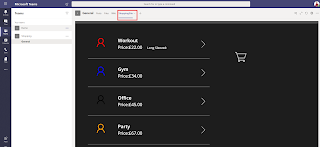
9. Now an new tab is added in General tab with name of an App (e.g. ShoppingSite).

Thanks for reading the article. Hope this Article will helpful for you. Cheers!!!
So, let's discuss step by step: -
1. Open https://admin.teams.microsoft.com/dashboard
2. Click on “Teams” and then “Manage Teams”.
3. Click on “Add” and create a new Team, I have created a Team with name “Shopping”.

4. Now open https://teams.microsoft.com/ , here we can see our created team inside “Teams” of Microsoft Teams.

5. Click on Plus Icon “(+)” in “General” Channel.

6. Search “PowerApps” and select it.
7. Now it will ask for add, so add it.

8. Search already created app, select it and Save it. Here I have already created an App with name ShoppingSite. We can create an App here https://make.powerapps.com/ with the help of https://docs.microsoft.com/en-gb/powerapps/maker/index

9. Now an new tab is added in General tab with name of an App (e.g. ShoppingSite).


Thanks for reading the article. Hope this Article will helpful for you. Cheers!!!


No comments:
Post a Comment